“Your mind is for having ideas, not holding them.”
– Tiago Forte
Hey Friends 👋
I don’t know about you, but my digital life is an absolute mess.
I have files everywhere.
My computer. My phone. My iCloud. My Google Drive. Hundreds if not thousands of notes across multiple note-taking apps. USB thumb drives in different drawers. Old hard drives that I may never look at again.
And the files and photos and everything else just keep coming.
It’s pretty insane when you think about it.
It’s basically digital hoarding.
But I read a book called Building a Second Brainand I learned a few things that helped me begin to simplify my digital life.
The first thing I did was go to my computer desktop, make a new folder called “Archive,” and drag everything else on the desktop into that folder.
Sound crazy?
Ok, well truthfully that wasn’t the first thing I did, but it was maybe my favorite part of implementing the PARA method.
PARA stands for Projects, Areas, Resources, and Archive.
You make one folder for each category at the top of your folder hierarchy like this:
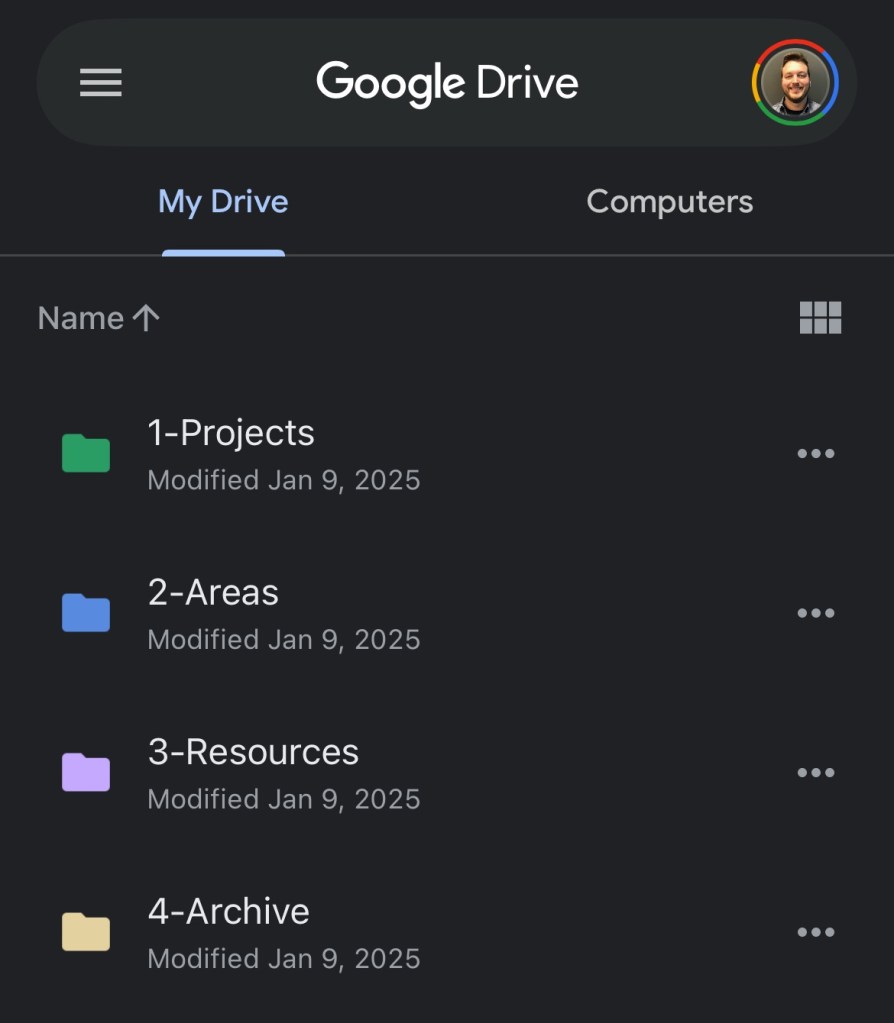
That’s it. Four folders.
Every file, every note, every document or download… they all fit into one of these four categories.
The idea is to optimize for actionability.
Instead of organizing things alphabetically, or chronologically, or by the dewey decimal system,we can organize things by how likely we are to need them in the near future.
A Breakdown of “PARA”
Projects are things with a deadline and specific outcome, or things you are actively working on. These are the most actionable items you have. Examples of projects and possible sub-folders within those might be be:
- “Sarah’s birthday party”
- Cake options
- Themes
- Bouncy houses
- “New client proposal”
- Outline
- Power Point presentation
- Supporting data
- “Trip to Japan”
- Hotels / AirBnB’s
- Restaurants
- Tours and attractions
- Itinerary
- “Kitchen renovation”
- Counters
- Floors
- Cabinets
- “Build a website/blog”
- Hosting services
- Colors, fonts, style guidelines
- Topics and idea
Areas are ongoing responsibilities you need to maintain. These things have no end date, but they need regular attention, and therefore are moderately actionable:
- “Health”
- Fitness
- Diet
- “Medical”
- Receipts
- EOB’s
- Eye
- Dental
- “Finances”
- Budget
- Statements
- “House stuff”
- HOA
- Mortgage docs
- Insurance docs
- “Taxes”
- 2025
- 2024
Resources are topics you’re interested in for the future. Think stuff that might be useful someday. These items are less actionable, but more for reference when needed:
- “Recipes”
- “Travel ideas”
- “Bucket List”
- “Marketing swipe file”
- “Professional headshot photos”
- “Resumes”
- “Screenshots from Woody’s Weekly emails”
The Archive is everything else. These are the least actionable things that you really haven’t needed in a long time. Old projects, outdated resources, things you’re keeping “just in case.” You aren’t deleting it, you’re just getting it out of the way.
The beauty is that everything you save goes into one of these four buckets.
No more wondering where to put that random PDF or screenshot.
No more wondering where to find it later.
Does this seem like something that you might try out?
Here’s How To Start:
Pick one platform.
This could be your notes app, Google Drive, your computer, whatever makes sense for you and doesn’t feel too daunting.
Next, create four folders with these exact names:
1-Projects
2-Areas
3-Resources
4-Archive
(Adding the numbers in front of each folder title will help keep them in order)
Lastly, spend 10 to 15 minutes sorting your most recent stuff into your new folders.
Don’t overthink it. If something could go in two places, just pick one and move on.
Anything that doesn’t fit into the first 3 folders just goes in the Archive for now.
That’s it!
Everything ends up somewhere. And everything is still very searchable in case you forget where you put it.
Move things around as things in your life change
An old Resource might inspire a new Project—for example, a collection of renovation photos you’ve been saving might be useful when you start your own renovation project.
An Area of your life might move to the Archive, say if you change jobs for example.
I found that getting all the digital clutter into these four buckets makes it much easier to find what I need, when I need it.
Things feel simpler, with far less overwhelm.
You’ll be shocked how much mental energy you get back when your digital life has a home for everything.
–
If you liked this post, you will love my weekly newsletter. Get on the list at woodyweekly.com
If you know someone else who might like to learn about the PARA method, send them this post!
Until next week,
—Woody
P.S. I learned about the PARA method from a book called “Building a Second Brain” by Tiago Forte. You can click here to get a copy for yourself, or click here to watch a video book summary I made (heads up, it’s about 18 minutes long but covers PARA plus a few other really interesting frameworks from the book).
P.P.S. Some links in this email are affiliate links. I may earn a commission, at no additional cost to you, so thank you for your support when you use my links!
—
Not already subscribed to Woody Weekly? Visit woodyweekly.com to get on the list. It’s free, I don’t sell your information, and you can always unsubscribe at any time.
 GROWNUP PAINS